
Download
Once you’ve completed your purchase, you can download your products anytime from your account. Just follow these steps:
Log in to your account using the email and password you used during checkout.
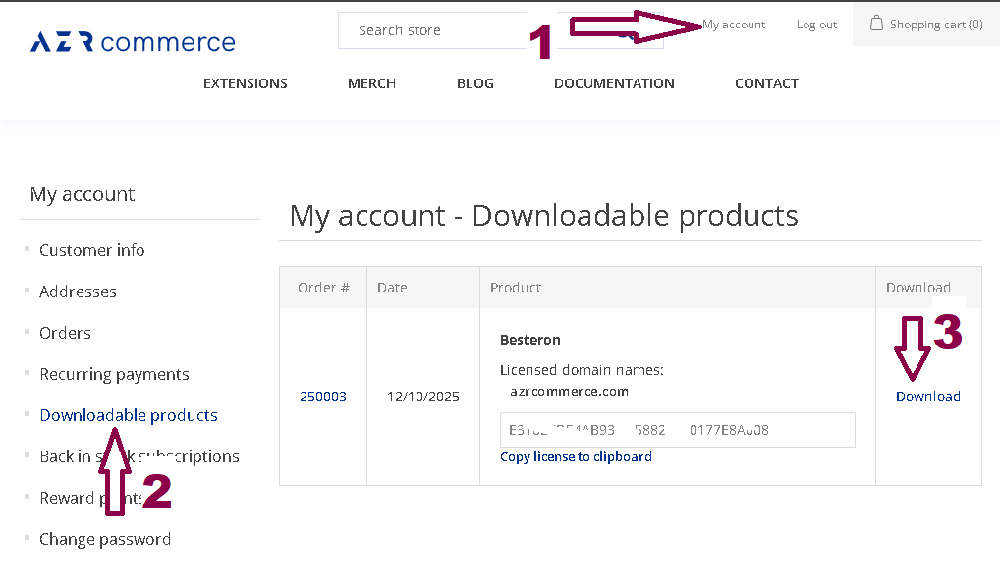
After logging in, go to “My account” — you’ll find it in the upper‑right corner of the website.
In the left‑hand menu, select “Downloadable products.”
You’ll see a table listing all products available for download.
Click the “Download” button next to the item you want to retrieve.
Your download will begin immediately. If you ever purchase updates or new versions, they will appear in the same place.
If You Don’t See Your Product or the Download Button
If the product does not appear in the list — or the Download button is missing — please reach out to us through the contact form or by email at helpdesk@azrcommerce.com. We’ll look into it right away and resolve the issue as quickly as possible.